Free • Private • Offline

Put your digital life in order.
For the people you love.

NEXT-of-KIN is a free, private tool that organises all your online accounts, passwords and digital assets into one secure offline file - ready for whoever needs it.

See how it works

Free tool to help your family find your accounts and passwords when it matters most. Private, offline HTML digital planner tool to organise your passwords and online assets for your next of kin.

Private - Offline. Nothing is stored online. Everything stays on your device.
Nothing sent to any server Works completely offline Single HTML file - no install 100% free
No registration required
No cloud storage
No ads, no tracking
Open source HTML
Works on any device

Most people leave nothing behind.

When someone passes, their family faces a maze of locked accounts, unknown passwords and lost income. NEXT-of-KIN fixes that - before it becomes a crisis.

Accounts get locked forever

Without login details, banks, email providers and platforms will eventually close accounts - taking memories, data and income with them.

Income stops unnecessarily

Websites, print-on-demand stores and hosting businesses can keep generating money - but only if someone knows they exist and how to access them.

2FA locks out even close family

Two-factor authentication codes go to your phone. If no one has access to it - or knows which accounts use it - they're locked out even with the right password.

It takes less than an hour

Filling this in isn't morbid - it's practical. It's the same logic as keeping a will, an insurance policy, or a spare key with someone you trust.

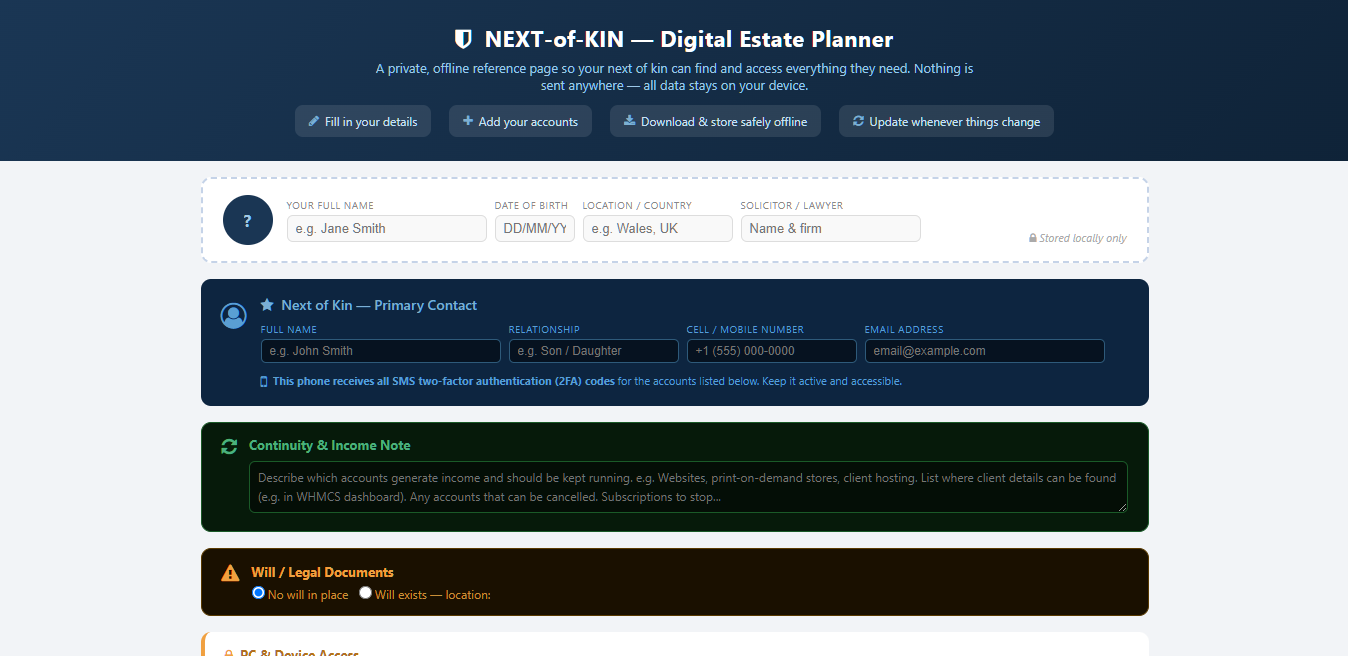
demo Next of Kin screenshot
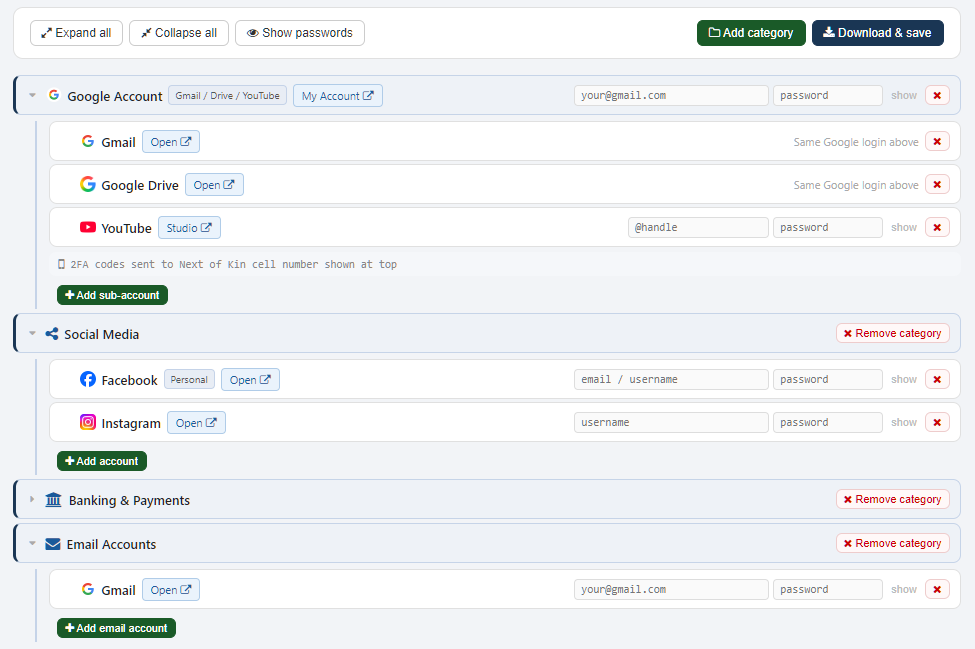
example digital accounts for Next of Kin screenshot

One tool. A dozen different reasons.

NEXT-of-KIN isn't just for the elderly or the seriously ill. If you have online accounts, it's for you.

Freelancers & Online Sellers

Your income doesn't stop when you do

You have a print-on-demand shop, an affiliate site, a Fiverr account. Without login details, that monthly income disappears - and your family won't even know to look.

"My Etsy shop makes more than my pension. My daughter needed to know it existed."
Parents & Homeowners

A modern household runs online

Utility accounts, mortgage portals, broadband, insurance, streaming subscriptions - all behind different passwords. If you're not around, your partner or kids face a wall of locked doors.

"After my husband's stroke, I spent three weeks trying to find our energy account login."
Creators & Content Owners

Protect what you built

Your YouTube channel, your photography portfolio, your domain names - these have real value. Without credentials and instructions, they get abandoned, hijacked or just quietly expire.

"I have 8 years of content on YouTube. I finally sat down and made a plan for it."
Business Owners

Your business shouldn't die with you

Domain renewals, hosting logins, CMS access, client portals - one missed renewal or locked account can take down a business your family could otherwise continue or sell.

"My accountant said it was the most practical thing I'd done for business continuity."
Young Professionals

You're not too young for this

You have more accounts than your parents ever did. Crypto wallets, investment apps, student loan portals, cloud storage. An accident doesn't give advance warning.

"A colleague was in a serious accident. His partner had no idea about any of his accounts."
Anyone with a Digital Life

If you have email, you need this

Every account you've ever signed up for is attached to an email. If no one can access that email, they can't reset anything. It's the master key - and most people never think about it.

"It took me 45 minutes to fill in. The peace of mind was immediate."
Four simple steps. Done in an afternoon.

Open the template

Download the free HTML file and open it in any browser. No install, no account needed.

Fill in your details

Add your accounts, passwords, next of kin info and any notes. Add or remove categories to fit your life.

Download your file

Hit "Download & save" to generate a personal, self-contained HTML file with everything baked in.

Store it safely

Save it to an encrypted USB drive, a fireproof safe, or with your solicitor. Update it whenever things change.

Your data never leaves your device

NEXT-of-KIN is a plain HTML file. There is no server, no database, no login, no sync. When you fill in a field and click Download, your browser creates the file locally and saves it directly to your computer.

We have no way to see your data - because it never reaches us. Ever.

  • No internet connection required after download
  • No JavaScript frameworks or external code - just HTML, CSS and vanilla JS
  • You can open and inspect every line of code yourself
  • Store the output file wherever you choose - we never see it
"The best time to do this was when you first built your online life. The second best time is today."
- The Laughing Professor

Everything a next of kin needs to find.

The template comes pre-built with the most common account categories - all editable, deletable and expandable to match your exact situation.

 Next of Kin details

  • Name, relationship, cell number
  • Email address
  • 2FA phone number note

 PC & device access

  • Windows / Mac username & password
  • PIN codes (PC and phone)
  • Key file locations

 Google Account

  • Gmail, Drive, YouTube
  • Single login with sub-services listed

 Social media

  • Facebook (personal & business)
  • Instagram, LinkedIn, Twitter/X, Pinterest

 Banking & payments

  • PayPal, bank accounts
  • Prepaid / payout cards

 Email accounts

  • Gmail, Yahoo, domain emails
  • Multiple accounts supported

 Add anything else

  • Custom categories with one click
  • Any account with URL, login & notes
  • File path references, expense notes

 Guidance sections

  • Continuity & income note
  • Will / legal documents status
  • Last updated date stamp

Built to be simple. Built to be useful.

Passwords hidden by defaultShow/hide individually or reveal all at once
Collapsible tree layoutExpand only what you need - easy to scan at a glance
Auto favicon iconsRecognisable brand icons fetched automatically for each site
Clickable login linksEvery account links directly to the right login page
Notes & expense fieldsRecord costs, renewal dates, billing cycles per account
File path referencesPoint to where important files live on your computer
Add & remove anythingFully customisable - build the structure that fits your life
One-click downloadAll your data saved into a single self-contained HTML file
Works on any devicePhone, tablet, laptop - any modern browser, no app needed
Update anytimeRe-open, change details, download again - always current

What people are saying

From retirees to freelancers, people who've filled this in say the same thing: why didn't I do this sooner?

★★★★★

I lost my dad last year and we spent weeks trying to get into his email and banking apps. His phone had 2FA on everything. I wish he'd had something like this. I filled mine in the same day I found it.

MK
Margaret K. Retired teacher, UK
★★★★★

I run three Shopify stores and two blogs. My wife had no idea any of them existed as income sources. This took me an hour to fill in and now everything is documented. Genuinely one of the most useful things I've done this year.

RT
Rob T. E-commerce seller, Australia
★★★★★

As a solicitor I often see families struggle with digital estate issues that simply weren't anticipated. This is a practical, no-nonsense tool that complements a will perfectly. I've started recommending it to clients.

SC
S. Chambers Solicitor, England
★★★★★

I'm a nurse and I see families in crisis regularly. The medical stuff gets planned for, but nobody thinks about the digital side. I shared this with my whole team and my own family got it done the same weekend.

PL
Paula L. NHS Nurse, Scotland
★★★★★

I'm 34 and didn't think I needed this. Then a friend my age had a brain aneurysm. I filled this in the next morning. It's not morbid - it's just practical, like having a will. Only took me 40 minutes.

JM
James M. Software developer, Canada
★★★★★

I was sceptical about storing passwords anywhere, but I actually read how it works and the fact that nothing goes online is exactly right. It's a local HTML file, I verified it. I've now got mine on an encrypted USB with my important documents.

DH
Dave H. IT manager, USA
Used NEXT-of-KIN?

We'd love to hear how it helped - and with your permission, share your story here.

 Send us your review

Common questions

Completely free, no catch. It's a single HTML file. There's no premium tier, no email signup, no upsell. It was built for personal use and shared because it seemed genuinely useful. If it helps you, that's enough.
The file itself is as safe as wherever you store it. The passwords are not encrypted in the HTML file - which is by design, so your next of kin can actually read them without needing software or a master password. Treat the downloaded file like a physical document: store it on an encrypted USB drive, in a fireproof safe, or with your solicitor. Do not store it in cloud services like Dropbox, Google Drive or iCloud.
Yes. After downloading the template, you can fill it in and use it entirely offline. The downloaded version (your saved file) is fully self-contained. The only thing that requires internet is loading favicon icons for each service - a small cosmetic feature that fails gracefully if offline.
Yes - that's the whole point. Click "Add category" to create a new section (e.g. "Web Hosting", "Freelance Clients", "Subscriptions"), then "Add account" inside it. Enter the name and login URL and it builds the entry for you, including fetching the site's icon automatically.
Any time you change a password, add a new account, or close an old one. A good habit is to review it every few months - treat it like updating a will. The "Update date" button stamps the current date so it's always clear how current the information is.
This isn't a replacement for a will - it's a companion to one. A will handles legal and financial assets. NEXT-of-KIN handles the digital side: online accounts, subscriptions, websites, income streams and the passwords to access them. They work best together. Consider leaving a copy of the file with your solicitor alongside your will.
Yes. They just open the HTML file in any browser (double-click it). Everything is labelled clearly, passwords can be shown with one click, and every account has a direct link to the login page. No technical knowledge required.

 Get your digital affairs in order - today.

It takes less than an hour. It could save your family months of stress, lost income, and locked accounts.

We'll email you the link  •  No spam  •  Unsubscribe anytime

Important: NEXT-of-KIN is an organisational tool, not a legal document. It does not replace a will, power of attorney, or professional legal or financial advice. Passwords stored in the downloaded file are not encrypted - store the file securely and treat it as you would any sensitive personal document. The Laughing Professor accepts no liability for loss arising from the use or misuse of this tool.
Share this Page: Share on Facebook Share on X Share on LinkedIn Share on Pinterest Share on Reddit Share on WhatsApp Share via Email
NEXT-of-KIN is a free tool by The Laughing Professor.  |  No data is collected.  |  Privacy policy