- "What is a Topical Authority Heatmap?"
A Topical Authority Heatmap is a visual representation of how well your website covers specific topics and subject clusters. It groups your pages by topic keywords found in URLs and titles, scores each cluster based on content depth, and highlights gaps where your site has little or no coverage - helping you understand how Google sees your content.
- "How does the Sitemap Meta Inspector work?"
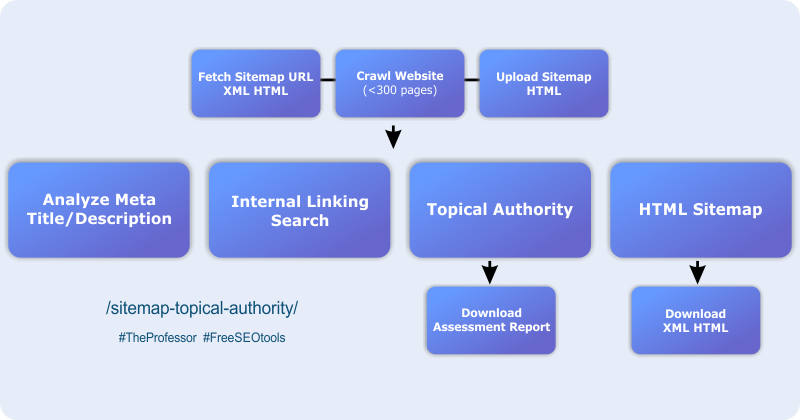
The Sitemap Meta Inspector reads your website's sitemap (XML or HTML) and crawls each URL to extract the page title and meta description. It then audits each page for missing, duplicate, or poorly optimised meta data, and produces a filterable list so you can quickly identify which pages need attention.
- "What sitemap formats does the tool accept?"
The tool supports three input methods: fetching a sitemap directly from a URL (sitemap.xml or sitemap.html), uploading an HTML sitemap file you have already generated, or crawling your domain automatically to discover all internal pages. This makes it compatible with WordPress, Wix, Shopify, and most other platforms.
- "How do I find my website's sitemap?"
Most website platforms such as WordPress, Wix, and Shopify generate a sitemap automatically. You can usually find it at yourdomain.com/sitemap.xml. If your site does not have one, you can create it using a plugin like Yoast SEO for WordPress or an online generator such as XML-sitemaps.com.
- "What can I download from the Sitemap Meta Inspector tool?"
The tool lets you download several outputs: a CSV file of all your URLs with their meta titles and descriptions, a generated HTML sitemap page ready to publish on your website, an XML sitemap file, and a PDF Topical Authority Heatmap report summarising your content clusters and coverage gaps.
- "What does the topical authority score mean?"
Each topic cluster is assigned a score that reflects its content depth - how many pages and sub-topics your site has within that theme. Clusters are colour-coded as Strong Depth, Developing, or Thin/Gap. A thin or gap score indicates an area where creating more content could significantly improve your topical authority in the eyes of search engines.
- "Can this tool help with internal linking?"
Yes. The tool includes an Internal Link Finder feature that lets you search your crawled pages to identify related content. You can use this to find relevant pages that should be linking to each other, improving both user navigation and the flow of link equity across your site.
- "Should every URL in my sitemap be indexed by Google?"
No. Being included in a sitemap does not guarantee or force indexation - Google still decides what to crawl and index. It is important to keep your sitemap clean and focused on canonical, valuable pages. Tag pages, filtered URLs, duplicate product pages, and URLs with parameters (such as ?sort_by=) should either be removed from the sitemap or set to noindex.
- "What is an AI Content Gap Analysis and how does it work?"
The AI Content Gap Analysis uses semantic clustering to analyse your existing content topics and identify subject areas where your site has insufficient coverage. It groups pages the way Google interprets them, assesses depth across all topic clusters, and provides specific recommendations for new content that would strengthen your topical authority.
- "Is the Topical Authority Heatmap tool free to use?"
Yes, the Sitemap Meta Inspector and Topical Authority Heatmap Assessment tool is freely available on The Laughing Professor website as part of the On Page SEO Toolbox. For those who prefer a done-for-you service, a professional heatmap report - including AI-powered topical analysis, content gap recommendations, depth scoring, and a shareable PDF - can be requested directly from The Laughing Professor.