
Analyzing Website Traffic for Security:
How to Protect Your Website and Data
Most website owners monitor analytics for visitors. Very few monitor for threats. Real data from 277 days and 1.4 million tracked events shows what is actually happening on your server — and whether your defenses are working.
The Gap Between What You See and What Is Really Happening
If your analytics shows 500 sessions a week, it feels like 500 people visited your website. That is a reasonable assumption. It is also wrong.
Over 277 days of server-side monitoring on LaughingProfessor.net, the Traffic Intelligence platform recorded 1,299,330 server requests. JavaScript beacon tracking confirmed 27,441 of those as genuine human page views. That is approximately 2.1% of all server activity.
The remaining 97.9% was automated — bots, crawlers, scrapers, security scanners, and in some cases, deliberate attacks.
If you are only monitoring page views, you are blind to the vast majority of what is actually hitting your server. Standard analytics tools like Google Analytics are deliberately designed to filter out non-human traffic — which means they are filtering out your threat data too.
Understanding the security picture requires looking at the full server request log, not just the human-facing analytics layer.
What the HTTP Status Code Data Reveals
HTTP status codes are the fastest way to understand the nature of traffic hitting your server. They tell you not just who visited, but what happened when they did.
At first glance, 285 total 404 errors and 33 bad requests sounds manageable. But the security relevance is in who generated them and from which paths.
The 400 Bad Request — A Bot Fingerprint
A 400 error means the server received a malformed request. Humans almost never generate these through normal browsing. When your logs show 400 errors from the same IP address repeatedly, or targeting paths that do not exist on your site, it is a reliable signal of automated probing.
The Traffic Intelligence data shows 4 unique URLs generating 400 errors from 31 unique IPs. That pattern — multiple IPs generating identical malformed requests — points to coordinated scanning activity rather than a single bad actor.
The 404 Pattern and WordPress Probing
LaughingProfessor.net does not run WordPress. Yet the server logs show repeated requests to paths like /wp-login.php and /wp-admin/. Every one of these generates a 404 — the file does not exist. But the scanning continues anyway.
Automated attack scripts operate from pre-compiled lists of known vulnerable paths. They do not check which CMS you are running before probing. They hit every site in their target range with the same list. A 404 response tells them to move on. An unexpected 200 response tells them to escalate. The volume of WordPress probing against non-WordPress sites is a measurement of how industrialized automated attacks have become.
Real Blocked IP Data: What the Threats Actually Look Like
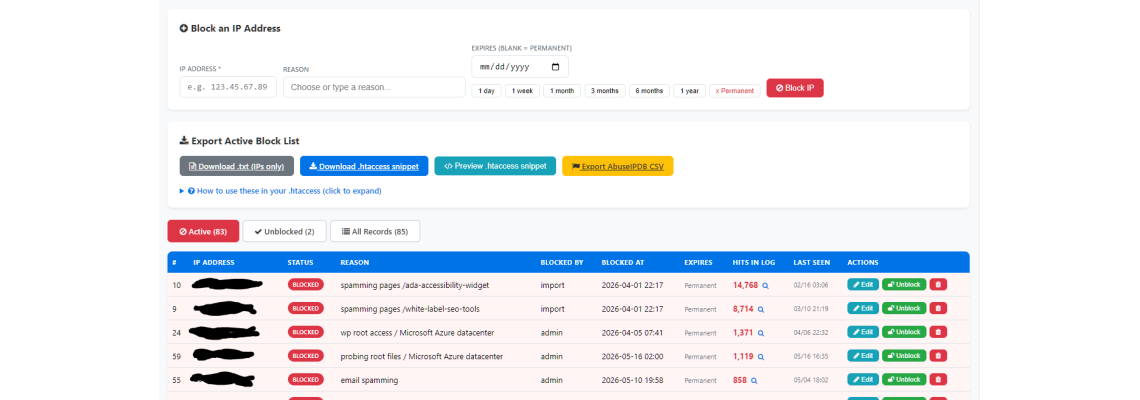
The Traffic Intelligence platform currently maintains 83 active IP blocks across 85 total records. The top entries in the block list tell a clear story about the nature of threats facing a mid-sized niche website.
| Threat Type | Reason Logged | Source | Hits in Log | Block Type |
|---|---|---|---|---|
| Page Spam | Spamming /ada-accessibility-widget | Imported list | 14,768 | Permanent |
| Page Spam | Spamming /white-label-seo-tools | Imported list | 8,714 | Permanent |
| Root Probe | WP root access attempt | Microsoft Azure | 1,371 | Permanent |
| Root Probe | Probing root files | Microsoft Azure | 1,119 | Permanent |
| Email Abuse | Email spamming | Admin review | 858 | Permanent |
Several things stand out in this data that are worth examining closely.
14,768 Hits From One IP — Before or After Blocking?
The top blocked IP accumulated 14,768 hits in the log, with a last-seen date of February 16 — well before the April 1 block date shown in the system. This is important. That hit count represents the intelligence gathered before the block was applied, not hits that got through a block.
This is the deliberate strategy behind the Traffic Intelligence approach: log first, block when confirmed. The result is a documented evidence trail for every blocked IP, making the block decision auditable and reversible.
Microsoft Azure as an Attack Source
Two of the top five blocked IPs originate from Microsoft Azure datacenters. This is not unusual — cloud infrastructure is routinely used to launch automated attacks because it is cheap, scalable, and provides geographic distribution. The challenge this creates for blocking strategy is significant: you cannot block Azure wholesale without potentially blocking legitimate SaaS traffic, CDN requests, or business users on Azure-hosted corporate networks.
The right approach is exactly what is shown here: block the specific IP, document the source as Azure, and monitor whether new Azure IPs exhibit the same behavior.
How Effective Is IP Blocking? The Honest Answer
IP blocking is widely recommended as a first line of defense. The reality is more nuanced. Effectiveness depends almost entirely on where in the request chain the block is applied.
Many shared hosting customers are told that adding Deny from [IP] to .htaccess will block attacks. Technically, this is true — the response will be blocked. But on most shared hosting configurations, the TCP connection, SSL handshake, and initial request parsing have already happened before .htaccess is consulted. The attacker gets a 403 response, but your server already paid the cost of handling the connection. For low-volume targeted blocking it still has value. Against high-volume attacks (like the 14,768 hit example above), it is not enough on its own.
The Case for Logging Before Blocking
Auto-blocking rules — where suspicious behavior triggers an automatic ban — are tempting because they feel proactive. They carry real risks:
- Shared IPs can block legitimate users on the same network
- Cloud infrastructure IPs rotate — a block becomes stale quickly
- False positives are hard to diagnose without a log trail
- You lose visibility into attack patterns you have not yet analyzed
The approach used here — log everything, block deliberately, document reasons — builds an intelligence database over time. Patterns that only become visible across weeks or months of data would be lost under an aggressive auto-block configuration.
How Effective Is Your Hosting Provider's Security?
This is the question most hosting providers would prefer you did not ask too directly. The honest answer is: it depends on what tier you are on, and almost nobody tells you explicitly where their firewall sits.
The right questions to ask your provider:
- Does your firewall operate before or after requests reach the server?
- Is DDoS mitigation included, and at what traffic threshold?
- Are malicious IPs blocked at the network edge or at the application layer?
- Do you provide access to raw server logs including bot and crawler traffic?
- Is mod_security or a WAF (Web Application Firewall) active on my account?
The strongest hosting configurations combine network-level DDoS protection, a WAF that processes rules before the application layer, raw log access for your own monitoring, and the ability to push custom IP blocks to the firewall level rather than relying solely on .htaccess. If your provider cannot answer the questions above, that is itself useful information.
The Gap That First-Party Tracking Fills
Even good hosting provider security does not give you visibility into what is being allowed through. The data in this article — every bot, every probe, every blocked IP with its full hit history — comes from the Traffic Intelligence Platform running independently of whatever the hosting provider does or does not block.
Hosting security and first-party tracking are not alternatives to each other. They operate at different layers and provide different information. You need both.
A Practical Security Monitoring Framework
Based on the data collected across this 277-day period, a practical approach to website security monitoring looks like this:
Step 1: Establish a Baseline
Before you can identify threats, you need to know what normal looks like. Deploy server-side tracking and run it for at least 30 days before drawing conclusions. Document your typical request volume, common user agents, and expected 200/301 distribution.
Step 2: Separate the Traffic Layers
Use the combination of server-side logging and JavaScript beacon tracking to cleanly separate human visits from automated requests. This two-layer approach is what makes the 2.1% human traffic figure meaningful — without both layers, you cannot calculate it.
Step 3: Flag and Review, Then Block
Set thresholds for review rather than automatic blocking. An IP generating 50+ requests in an hour targeting non-existent paths deserves a flag. An IP with 500 hits across two weeks hitting the same tool page is worth a permanent block. Document your reasoning in the block record.
Step 4: Export and Escalate When Appropriate
The block list in Traffic Intelligence exports directly to .htaccess snippet format, plain IP lists, and AbuseIPDB CSV. For IPs that represent serious or persistent threats, reporting to AbuseIPDB contributes to the shared intelligence network that other site owners rely on.
Frequently Asked Questions
How do I know if my website is being attacked?
Does blocking an IP address in .htaccess actually stop attacks?
Should I automatically block every suspicious IP address?
Can I block Microsoft Azure or Amazon AWS IP ranges if attacks come from there?
What do HTTP 400 Bad Request errors mean for website security?
Why does my server get WordPress login attempts when I don't use WordPress?
How effective is my hosting provider's built-in security?
What is the difference between AI crawler traffic and malicious bot traffic?
The Bottom Line
Over 277 days, 83 IPs were blocked, 354,000+ bot requests were logged, and the top attacking IP alone generated nearly 15,000 hits before being permanently blocked. None of that appeared in standard analytics.
Protecting your website starts with seeing it accurately. Standard analytics tools show you one thin slice of your server activity. Server-side tracking with IP intelligence shows you the rest — which is where the threats live.
The data in this article was collected using the Traffic Intelligence Platform. All statistics reflect first-party tracking on LaughingProfessor.net across the 277-day period referenced in this series.
Related Products
Please Share







Leave a Comment