

Progressive Web Apps Explained: How Turning Your Website Into an App Brings More Visitors, Longer Stays, and Better Search Rankings
Published by The Laughing Professor | Web Performance & SEOIntroduction: Your Website Has a Hidden Problem
Imagine spending real money on a beautiful website, solid SEO, and paid ads - only for a visitor to land on your page, browse for 30 seconds, close the tab, and forget you ever existed. They won't bookmark you. They'll Google you again next time... and maybe click a competitor instead.
This isn't a failure of your website's design. It's a structural problem with how people use the web. Tabs get buried. Bookmarks go unvisited. Out of sight really is out of mind.
There is a solution — and it doesn't cost $10,000 or require you to rebuild anything. It's called a Progressive Web App, or PWA.
This article explains exactly what a PWA is, how it works under the hood, and why adding one to your existing website can genuinely move the needle on traffic, dwell time, bounce rates, and search engine rankings.
Test your website
What Is a Progressive Web App (PWA)?
A Progressive Web App is your existing website - enhanced with a small layer of technology that allows it to be installed directly onto a visitor's phone or desktop, just like a native app downloaded from the App Store or Google Play.
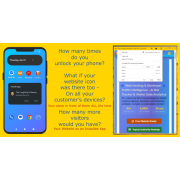
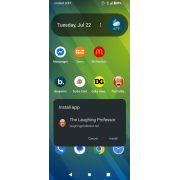
The key difference? Your visitors don't need to visit an app store. They don't need an account. They simply tap a prompt on your website, and within two taps, your icon is sitting on their home screen.
From that moment on, when they tap your icon, your site opens in its own full-screen window — no browser bar, no address field, no distractions. It looks, feels, and behaves exactly like an app they paid for and downloaded, because in every practical sense, it is one.
PWAs are not a new gimmick. They are a W3C open web standard supported by Google, Apple, Microsoft, and Mozilla. Companies like Starbucks, Twitter, Pinterest, and Uber all use PWA technology. The difference is that small businesses can now access the same capability — without the enterprise price tag.
The Two Technical Pieces That Make It All Work
You don't need to understand the code deeply to appreciate what's happening. But it helps to know the two core components, because they explain everything about why PWAs perform so well.
1. The Web App Manifest
The manifest is a small JSON file that lives on your server. It tells the browser everything it needs to know about your "app" - your name, your icon, your brand colors, and how the app should open.
A link to this manifest is placed in the <head> section of every page of your website, like this:
html
<link rel="manifest" href="/manifest.json" />
Inside the manifest file, you define things like:
json
{
"name": "Your Business Name",
"short_name": "YourBiz",
"start_url": "/",
"display": "standalone",
"background_color": "#ffffff",
"theme_color": "#1a73e8",
"icons": [
{
"src": "/icons/icon-192.png",
"sizes": "192x192",
"type": "image/png"
},
{
"src": "/icons/icon-512.png",
"sizes": "512x512",
"type": "image/png"
}
]
}
This file is what makes the browser say: "This isn't just a webpage — this is an installable application."2. The Service Worker
The service worker is a small JavaScript file that also lives on your server, and it is registered in your site's <head> with a short script:
html
<script>
 if ('serviceWorker' in navigator) {
 navigator.serviceWorker.register('/service-worker.js');

}
</script>
This script runs silently in the background. Think of it as a super-intelligent middleman that sits between your visitor's browser and your server. It intercepts network requests and decides the smartest, fastest way to respond.
Here is what a service worker can do:
What Can a Service Worker Actually Do?
This is where PWAs genuinely pull ahead of standard websites.Smart Caching (Blazing Fast Load Times)
When a visitor first arrives at your site, the service worker quietly stores key files - your logo, your CSS, your core pages - in the browser's local cache. The next time that visitor returns, those files load from their own device rather than traveling across the internet from your server.
The result? Pages that load in a fraction of a second, even on slow mobile connections.
Google's own research found that 53% of mobile visitors abandon a site that takes longer than 3 seconds to load. With a service worker handling your cache intelligently, repeat visitors experience near-instant load times. That means fewer people leaving before they've read a single word.
Offline Functionality
Because the service worker caches your content locally, it can serve pages to visitors even when they have no internet connection - on the Underground, in a rural area, in a building with poor signal.
At minimum, a well-configured service worker shows a custom offline page rather than the browser's default grey error screen. More advanced setups can serve entire sections of your site entirely offline. This is a level of reliability no standard website can offer.
Push Notifications (Optional)
With visitor permission, a PWA can send push notifications directly to a visitor's device - even when they're not on your website.
This means you can alert customers to a new blog post, a flash sale, a service update, or an appointment reminder — reaching them directly on their home screen without relying on email open rates or social media algorithms. You own the channel.Background Sync
Service workers can queue actions taken offline and sync them automatically when the connection is restored. A customer fills out a contact form with poor signal? The service worker holds that submission and sends it the moment connectivity returns - invisibly, without the user needing to do anything.
Custom Install Prompt
Rather than relying on the browser's default install banner (which is easy to miss), a properly configured PWA lets you control when and how the install prompt appears - timed strategically, after a visitor has shown genuine interest, maximising the chance they tap "Install."
How This Directly Increases Website Traffic
Let's connect the technology to the business outcome, because this is where it gets genuinely exciting.
Your Icon Lives on Their Home Screen
The average person unlocks their smartphone 96 times per day. Every single time they do, they see your icon. That is free, passive brand exposure you don't pay a penny for after the initial setup.
Studies consistently show that installed apps receive 3x more return visits than bookmarked websites. That is not a marginal improvement — it is a fundamental shift in how often real customers actually come back to you.
You Are No Longer Competing on Google Every Single Time
When your icon is on someone's home screen, they don't Google you next time. They tap your icon. This removes you from the search competition for return visitors and eliminates the risk of a competitor's ad intercepting them on the way back to you.
Reduced Dependence on Social Media Algorithms
Push notifications, when used thoughtfully, let you reach your own audience directly. No algorithm decides whether your post gets shown. No boosted spend required. You notify them; they see it.
How PWAs Help Your Search Engine Rankings
The connection between PWA technology and SEO is not a vague one. It is specific, measurable, and well-documented.
1. Page Speed Is a Confirmed Google Ranking Factor
Google has explicitly stated that Core Web Vitals - which measure how fast and stable your pages are — directly influence search rankings. The caching technology built into a PWA's service worker dramatically improves these scores for repeat visitors by serving resources locally rather than over the network.
Faster pages rank better. There is no ambiguity here.
2. Dwell Time Signals Quality to Search Engines
Dwell time — how long a visitor spends on your site before returning to the search results — is one of the strongest indirect signals of content quality that Google monitors.
When your site loads instantly and feels like a native app, visitors stay longer. When an install prompt encourages them to save your site to their home screen, they come back more often and spend more time across multiple sessions. Longer sessions and more return visits signal to Google that your site is worth ranking highly.
3. Reduced Bounce Rates
A bounce occurs when a visitor lands on your page and immediately leaves without interacting further. High bounce rates suggest to search engines that your site didn't satisfy the visitor's intent.
PWA caching eliminates one of the most common causes of bouncing: slow load times. When your page appears instantly, visitors actually read it. When a well-timed install prompt engages them mid-visit, they explore further. Bounce rates fall, and rankings improve as a consequence.
4. Increased Engagement Metrics Across the Board
Google watches engagement broadly: pages per session, scroll depth, return visit frequency, direct traffic volume. A PWA systematically improves every one of these metrics by making your website faster, more reliable, more accessible, and more present in the daily life of your visitors.
When direct traffic to your site increases - because people are tapping your home screen icon rather than searching — it also sends a strong signal that yours is a brand people intentionally seek out. Google rewards that.
How the Install Prompt Works for Your Visitors
For all the technical sophistication behind it, the visitor experience is remarkably simple.
- A visitor arrives on your website through any normal channel — Google search, a social post, a link from a friend.
- After they've had a moment to engage with your content, a small, polite prompt appears: Add [Your Business] to your home screen."
- They tap. Two taps later, your icon appears on their home screen.
- From this point forward, your website opens like an app — full screen, fast, and familiar.
No app store. No account creation. No download waiting. On iOS (16.4+), Android, Chrome desktop, and Edge desktop — which covers the overwhelming majority of devices — this works seamlessly.
Is This Different From a Normal App?
Technically, yes. A PWA is built with standard web technologies — HTML, CSS, and JavaScript — rather than native iOS or Android code. But to your visitors, it is indistinguishable from any other app on their phone.
Same icon. Same full-screen experience. Same speed. None of the app store friction.
The practical upside for you as a business owner: your existing website becomes the app. Any updates you make to your website automatically appear in the installed app. No resubmission. No version numbers. No maintenance cost beyond your normal site updates.
Who Should Be Using a PWA?
The short answer is: any business that benefits from repeat visitors.
- Restaurants and cafés - customers checking menus and hours, again and again
- Salons, spas, and service businesses - repeat bookings are your lifeblood
- Online stores - return shoppers spend significantly more than first-time visitors
- Gyms and fitness studios - daily touchpoints with members
- Consultants, coaches, and advisors - regular content builds authority and trust
- Local retailers - keeping your brand top-of-mind between purchases
- Membership sites - the entire value proposition depends on return visits
If any of your customers come back more than once — and whose don't? — a PWA is working for you every single day.
Getting a PWA Set Up on Your Website
A properly configured PWA requires:
- A valid, correctly structured web app manifest with appropriate icons (multiple sizes, correctly formatted)
- A service worker registered via the site's
<head>with a caching strategy tailored to your site's structure - An install prompt timed and styled to convert at the right moment
- Custom branded icons and splash screen assets
- Testing across real devices - iOS, Android, Chrome, and Edge all have their own nuances
Done properly, the entire setup is a one-time investment that works indefinitely. Done incorrectly, the browser simply ignores the manifest and the install prompt never fires.
The Laughing Professor offers a complete done-for-you PWA setup service for $179 - a one-time fee with no monthly costs.
This includes the full installable app configuration, custom branded icons, smart caching setup, install prompt optimisation, cross-device testing, and a simple guide for your team.
See exactly what's included and how your website can become an installable app
If you're ready to get set up, the process takes 3–5 business days:
Start your PWA setup for $179The Bottom Line
A Progressive Web App is not a redesign. It is not a rebuild. It is a technology layer added to your existing website that transforms a forgettable browser tab into an icon on your customer's home screen.
The outcomes are real and measurable:
- More return visits - because your brand is literally in front of them every day
- Faster load times - because the service worker caches your site locally
- Lower bounce rates - because visitors who installed your site came back intentionally
- Better search rankings - because Google rewards the engagement signals that PWAs generate
- Push notification capability - because you shouldn't have to rent your own audience from a social platform
The technology that Starbucks, Twitter, and Pinterest use to keep millions of users engaged is available to your business today — without the app store, without the six-figure development cost, and without the ongoing maintenance headache.
Your logo. Their home screen. More customers coming back.
This article is part of The Laughing Professor's On Page SEO Toolbox — practical, plain-language guidance for small business website owners who want real results.View more SEO tools and services
Related Products
Please Share






Leave a Comment