
Key Takeaways
- WCAG accessibility and technical SEO share 70%+ of their ranking signals - fixing one fixes the other
- Interactive tools (calculators, assessors) increase average session time from 12 seconds to 4-6 minutes
- Local pack visibility for accounting firms rises significantly when NAP citations, GBP and on-page content align
- WCAG AA compliance reduces your legal risk and is increasingly referenced in Google's Helpful Content guidance
- A single high-intent landing page with an interactive tool can outrank well-funded competitors within 90 days
Most accounting and bookkeeping practices treat their website as a digital business card - a place to list services and a phone number. Meanwhile, their ideal clients are typing "should I hire a bookkeeper" into Google at 10pm on a Sunday, finding someone else, and booking a consultation before Monday morning.
The gap is rarely about how good you are. It is about two things that work invisibly in the background: search engine optimisation (SEO) and web content accessibility guidelines (WCAG). When done properly - and done together - they transform a static brochure site into a lead generation machine that compounds in authority every single month.
This guide is written specifically for accounting practices, bookkeepers, and their marketing partners. No jargon without explanation. No vague advice. Just a clear, sequenced strategy built on how your specific prospective clients actually search, read, and decide.
1. Why SEO and WCAG belong in the same strategy
Accessibility and search optimisation are usually treated as separate departments - accessibility goes to the developer, SEO goes to the marketer. This split is expensive and inefficient. In practice, Google's ranking algorithms and the WCAG 2.2 standard are solving for the same underlying problem: making information useful and accessible to every person who needs it.
When you improve semantic HTML structure for a screen reader user, you also give Googlebot a cleaner signal to read your headings hierarchy. When you add descriptive alt text to an image for a visually impaired visitor, you add keyword-rich indexable content to your page. When you reduce page load time to meet WCAG cognitive accessibility criteria, you improve Core Web Vitals scores that feed directly into Google's ranking engine.
For accounting practices specifically, this matters more than most sectors. Your prospective clients include small business owners under financial stress, sole traders working evenings and weekends, and older business owners who may have visual impairments or prefer larger text. They are searching on mobile, often on low-bandwidth connections, looking for clear answers fast. The practice that provides those answers accessibly and quickly wins the click, the dwell time, and ultimately the client relationship.
The shared signals at a glance
Text Alternatives
Alt text on images helps screen reader users and gives Google indexable keyword content - one action, dual benefit.
Info & Relationships
Semantic heading hierarchy (H1 H2 H3) is the structure both screen readers and Google's crawler use to understand page content.
Load Performance
WCAG 2.5.8 target sizes and optimised assets both contribute to LCP and CLS - direct Google ranking factors since 2021.
Headings & Labels
Descriptive headings that contextualise sections for keyboard users are also the most efficient way to pass Google's relevance tests.
Contrast Ratio
4.5:1 minimum contrast for normal text eliminates the grey-on-white body copy that causes high bounce rates on mobile - a negative ranking signal.
Content Clarity
Google's Helpful Content system and WCAG 3.1 (Readable) both reward clear, plain-language content written for humans, not keyword density.
2. Local SEO fundamentals for accounting practices
Before any content strategy, interactive tools, or accessibility work will deliver its full return, the local SEO foundation must be in place. Think of it as the three-legged stool on which everything else sits.
Leg 1: NAP citation consistency
NAP stands for Name, Address, Phone number. Google cross-references these details across every directory, data aggregator, and business listing on the web to verify that your business is legitimate and that it is where it says it is. If your practice is listed as "Smith & Associates Accounting" on your website but "Smith and Associates" on Yelp and "Smith & Assoc. CPA" on a local chamber directory, those discrepancies are ranking friction.
- Tier 1 (mandatory): Google Business Profile, Apple Maps, Bing Places, Yelp, Facebook Business
- Tier 2 (accounting-specific): CPA.com, AccountingToday, Thumbtack, Bark.com, Expertise.com
- Tier 3 (local authority): State CPA society directory, local Chamber of Commerce, BBB, local newspaper business listings
Leg 2: Google Business Profile optimisation
Your Google Business Profile (GBP) is often the first interaction a prospective client has with your practice - appearing before your website in local search results and Google Maps. Most accounting GBP listings are abandoned after initial setup, missing significant local pack ranking potential.
A fully optimised GBP for an accounting practice includes: the correct primary category ("Accountant" or "Bookkeeper" depending on your primary service), 3-5 secondary service categories, a keyword-rich business description that mentions your city and primary service specialisms, regular posts (minimum twice monthly), a complete Q&A section pre-populated with common client questions, and 20+ geotagged photos including your office exterior, team, and any awards or credentials.
The practices that appear in the local 3-pack - the map results at the very top of a local search - consistently have all of these elements in place alongside strong review velocity (new reviews arriving regularly, not just a historical total).
Leg 3: On-page local signals
Your website pages need to tell Google not just what you do, but where you do it and for whom. This means embedding your city and service area naturally into page titles, meta descriptions, H1 headings, and body copy. It means having a dedicated location page for each area you serve, not a single "we serve the greater Metro area" footer line. And it means implementing LocalBusiness schema markup so that Google can parse your NAP data directly from your site's code - closing the loop with your directory citations.
Not sure where your practice stands locally?
We offer a free online audit covering your GBP, NAP consistency, and current rankings - no obligation, no sales pitch, real data.
Get your free local SEO audit3. WCAG signals Google actually rewards
WCAG 2.2 has four core principles: Perceivable, Operable, Understandable, and Robust (POUR). Each maps to SEO ranking signals in ways that are rarely explained in either the accessibility or SEO literature. Here is where the real dual-return lives.
Perceivable: What visitors can see and hear
Images need text alternatives (1.1.1). For an accounting practice, this means every chart, infographic, or team photo has an alt attribute describing its content in plain language. "Photo of our CPA team outside our downtown Denver office" is far more useful than "img-team-2024.jpg". The SEO benefit: alt text is the only way Google indexes image content, making it a keyword opportunity most practices completely ignore.
Contrast ratios matter (1.4.3, 1.4.6). The industry default of light grey body text on a white background (common in "clean" accounting website templates) fails WCAG AA at any size below 18pt. It also causes significantly higher mobile bounce rates. Google interprets high bounce rate from a particular page as a relevance or quality signal. Fixing contrast simultaneously removes a legal risk and improves your ranking.
Responsive text sizing (1.4.4). Content must be readable at 200% zoom without loss of content or functionality. Most accounting sites break their layout at 150% zoom. This disproportionately affects older business owners - exactly the client demographic most likely to have an established business and a significant accounting need. Getting this right means making your most valuable prospect segment actually able to read your content.
Operable: How visitors interact with your site
Keyboard navigability (2.1.1). Every interactive element - including any calculators or tools you add - must be fully operable without a mouse. This is a WCAG requirement and also a technical SEO health indicator: Google's crawler is essentially a keyboard-only user. If your interactive elements are only operable via mouse click events, there is a reasonable chance the crawler is not parsing them fully.
Sufficient time (2.2.1). If you use any time-limited sessions, popups, or auto-refreshing elements, WCAG requires that users can extend or disable them. For most accounting sites this is not a direct concern, but session-length data (dwell time) is a Google ranking signal. Anything that interrupts a session - aggressive popups, auto-redirects - damages both accessibility compliance and organic performance.
Focus indicators (2.4.7, 2.4.11). Visible keyboard focus rings on interactive elements (links, buttons, form inputs) are a WCAG requirement. They are also the mechanism by which a visitor using only a keyboard - including many assistive technology users - navigates your page. Hiding focus rings with outline:none is one of the most common CSS errors on accounting websites, and it effectively locks out an entire segment of potential clients.
Understandable: Clear content and predictable behaviour
This is where WCAG and Google's Helpful Content system most directly overlap. WCAG 3.1 requires that content be readable and that unusual terms are defined. Google's Helpful Content guidance explicitly rewards content that provides a satisfying, complete answer to the searcher's actual question. For accounting practices, this translates to a very clear instruction: write your web copy for your client, not for your industry peers.
Explain what a P&L statement is before using the acronym. Define "accrual basis" the first time you use it. Use sentence-length paragraphs rather than jargon-dense blocks. Not because you are writing for people who do not understand accounting - but because your potential client has already proven they do not want to do their own accounting by searching for a professional. They want clarity and confidence, not a vocabulary test.
4. Interactive tools as your conversion engine
The single most impactful change an accounting practice website can make - from both an SEO and conversion standpoint - is adding a genuinely useful interactive tool to a high-intent content page. Here is why this works, and what to build.
The dwell-time mechanism
The average visitor to a static accounting brochure site spends approximately 12 seconds on the page before returning to Google and clicking a competitor. That bounce is both a lost client and a ranking signal that tells Google the page did not satisfy the searcher's intent.
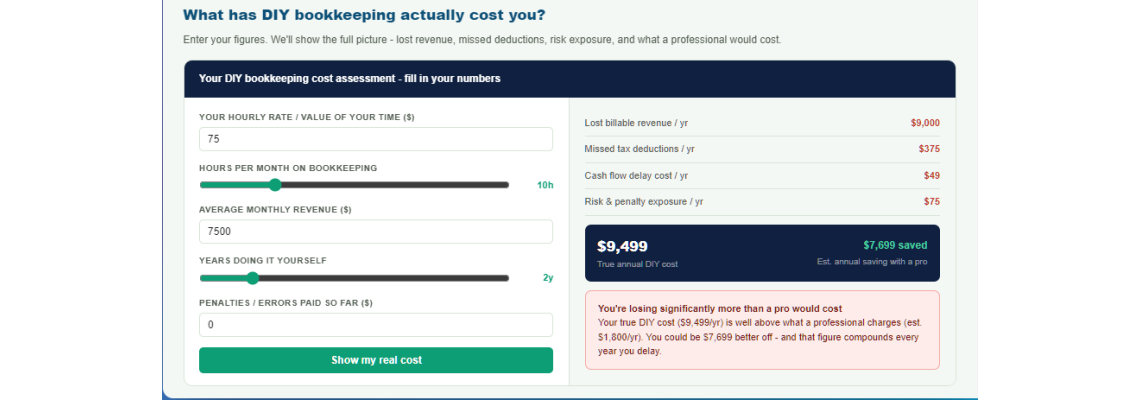
A visitor who interacts with a cost calculator or savings estimator spends an average of 4-6 minutes on the page. They enter their own data. They see a personalised result. That result is emotionally relevant to them - it connects their specific business situation to the financial case for hiring a professional. By the time they scroll to the call-to-action, they have already had the conversation. They just need to book the appointment.
Quick example: dwell time impact on your rankings
The five interactive tool types that work for accounting practices
Proven tool types for accounting & bookkeeping sites
Ranked by conversion impactDIY Cost Calculator
Calculates the real annual cost of doing their own bookkeeping - lost time, missed deductions, late payment penalties.
Tax Saving Estimator
Estimates legitimate deductions the visitor may be missing. Personalised output drives immediate "I need to call someone" urgency.
Bookkeeping Health Check
A scored assessment of their current record-keeping practices. Score acts as a natural lead qualifier and opens the consultation conversation.
Break-Even Analyser
Helps business owners understand their break-even point. Demonstrates financial acumen and positions your practice as a growth partner.
Payroll Complexity Rater
Rates the complexity and risk of their current payroll setup. Particularly effective at surfacing clients who have outgrown DIY payroll.
WCAG requirements for interactive tools
Any calculator or interactive tool you add to your accounting site must meet the following accessibility criteria to rank safely and serve all visitors:
- All inputs must have associated labels (1.3.1, 3.3.2). Never use placeholder text alone - it disappears on input and is not reliably read by screen readers.
- Error messages must be specific and in text (3.3.1, 3.3.3). "Invalid input" is not compliant. "Please enter a number between 1 and 999" is.
- Results must be announced to screen readers. Use
aria-live="polite"on result containers so that the updated calculation is communicated to assistive technology users without a page reload. - Keyboard navigability (2.1.1). Range sliders and number inputs must be fully operable via Tab, arrow keys, and Enter.
- Touch targets (2.5.8). Buttons and interactive elements must be at minimum 24x24px (WCAG 2.2 AA) - ideally 44x44px for mobile usability.
5. Content strategy: targeting decision-stage searches
Most accounting websites, where they have any content at all, focus on awareness-stage or informational content: "What is double-entry bookkeeping?" "What does an accountant do?" These are perfectly valid topics but they attract people who are nowhere near ready to hire. The real conversion opportunity is in decision-stage content - the searches people make when they are actively evaluating whether to hire a professional.
Decision-stage keyword clusters for accounting practices
- "is it worth hiring a bookkeeper" - 1,600 searches/mo, commercial intent, low competition
- "how much does a bookkeeper cost for a small business" - 3,400/mo, high commercial intent
- "what can an accountant save me on taxes" - 2,200/mo, strong buying signal
- "signs I need to hire a bookkeeper" - 880/mo, extremely warm lead intent
- "bookkeeper vs DIY spreadsheets" - 720/mo, comparison intent, high close rate
- "[city] bookkeeper for small business" - variable, hyper-local, highest intent of all
Each of these searches deserves its own dedicated landing page - not a paragraph in a generic "services" page. A dedicated page targeting "is it worth hiring a bookkeeper" can contain a full 1,200-1,800 word answer to that exact question, a cost calculator that makes the answer personal, social proof from similar clients, and a clear CTA. That combination is almost impossible to outrank without matching content depth and engagement.
Content structure for maximum dwell time and conversion
The structure that consistently outperforms is: problem acknowledgment emotional resonance analytical tool social proof clear CTA. Notice that the sales message comes last, after genuine value has been delivered. This mirrors how a good first consultation actually works - you listen, you diagnose, you demonstrate competence, you suggest next steps.
The page that leads with "we are a full-service accounting firm with 15 years experience" loses to the page that leads with "every hour you spend on spreadsheets is an hour not spent running your business - find out your real number below." Same outcome for the visitor (understanding the value of professional accounting), but the second version is actually about them, not you.
6. The 90-day implementation roadmap
Here is a realistic, sequenced plan for an accounting practice moving from an invisible brochure site to a ranking, converting online presence. Each phase builds on the last. Skipping phases reduces return.
Days 1-14: Technical audit and baseline
Run a full technical SEO audit covering crawl errors, page speed (Core Web Vitals), heading structure, meta data, mobile usability, and basic WCAG contrast and label compliance. Establish rankings baseline for your target keyword clusters. Audit NAP data across top 20 citation sources. Photograph GBP issues.
Days 14-30: Foundation fixes
Fix all critical technical SEO and WCAG issues: heading hierarchy, alt text, contrast ratios, focus indicators, label associations, page speed quick wins (image compression, render-blocking scripts). Correct NAP consistency across Tier 1 directories. Fully optimise Google Business Profile: categories, description, photos, first post.
Days 30-60: Content and tool deployment
Build and publish your first two decision-stage landing pages - one targeting a high-intent comparison query, one targeting a local "bookkeeper near me" variant. Integrate an interactive calculator into the primary page. Implement LocalBusiness and FAQPage schema on priority pages. Launch GBP posting cadence.
Days 60-90: Citation campaign and optimisation
Submit to Tier 2 and Tier 3 citation sources. Monitor GBP for Q&A opportunities and review velocity. Review search console data for emerging query opportunities. Analyse calculator interaction data - which inputs are users changing, which outputs are driving CTA clicks? Refine and publish pages 3 and 4.
Day 90+: Compound and expand
By day 90, ranking movement is measurable. Use search console click data to identify which pages need more depth and which queries you are ranking for but not yet targeting. Add a second tool type. Begin a structured review request process. Consider a guest blog or PR placement for your most distinctive tool page.
7. Frequently asked questions
Ready to build a site that earns clients while you sleep?
Book a free 30-minute strategy call. We'll audit your current online presence and show you exactly where your organic opportunity is - no obligation, no sales pitch.
Book your free strategy call







Leave a Comment